A Backgammon App Designed for Mobile, Tablet and Desktop
A responsive backgammon app to play in your browser
GamesGrid runs directly in your browser, so you do not need to download an app before you can play.
But browser-based does not mean we designed one desktop game and simply made it smaller until it fitted on a phone.
We designed different layouts for desktop, tablet and mobile, each built around the screen it will actually be played on. The goal is always the same: give the backgammon board as much space as possible, keep it in the correct proportions and still leave room for everything you need around it.
GamesGrid automatically recognises the screen you are using and presents the game in the layout designed for it.
Open your browser. Take your seat
There is no separate GamesGrid client to install and no app store you have to visit before your first match.
The same account follows you from one device to another. Start on your desktop, open GamesGrid later on your tablet or take a quick game with you on your phone.
You are always entering the same club. Only the layout changes.
One game. Different screens. Different layouts
A backgammon board has a shape that should not be compromised.
Simply shrinking a desktop interface creates a choice we did not want to make: either the board becomes too small, or the controls and information around it start covering the game.
So we designed the layouts separately.
The position of the board, player information, avatars, score, pip count, doubling cube and clock can change depending on the device. Elements are moved, simplified or reorganised when the available space changes.
The board itself remains the centre of the experience.
We want every available pixel to work for the game.
On a phone, turn the board sideways
A backgammon board is wide. Your phone is not, unless you turn it.
GamesGrid therefore plays in landscape on mobile. Hold your phone vertically and the game asks you to rotate it. Turn it sideways and the full board opens up.
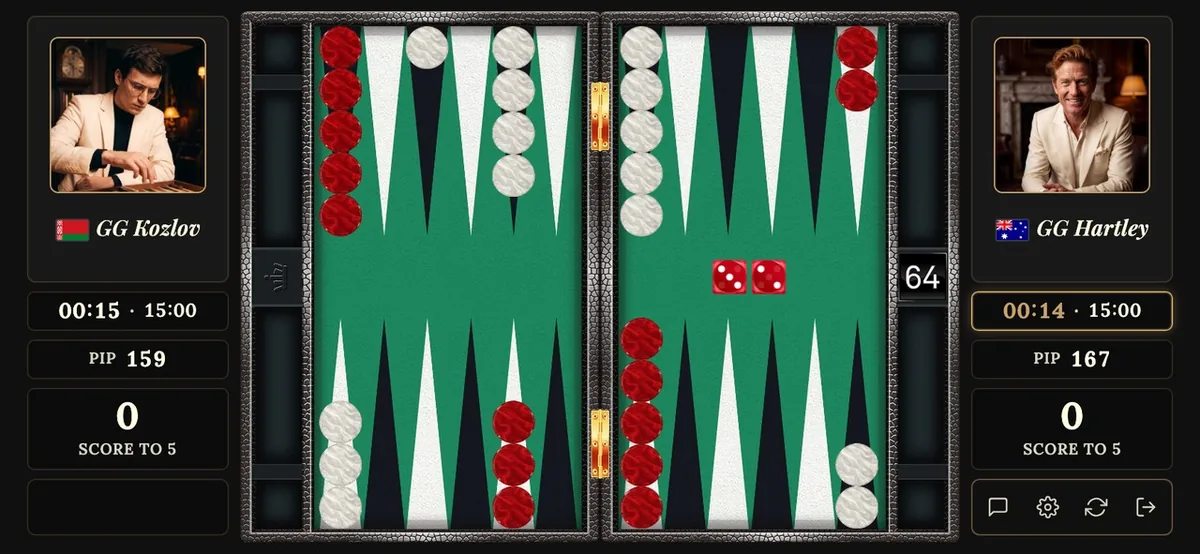
A match on a phone in landscape: the full board, the cube and the clock.
This gives us enough width to keep the board large and correctly proportioned, while using the remaining space for the information you need during the match.
Your opponent and avatar, score, clock, cube and pip count remain within reach without taking over the board.
We would rather ask you to rotate your phone than reduce backgammon to a tiny board surrounded by menus.
Made for the screen in your hand
The mobile interface is not just the desktop interface viewed through a smaller window.
Controls are positioned for fingers. Information is condensed where necessary. Elements that need more room on desktop are reorganised for the smaller screen.
The result is a board that remains large enough to read comfortably and easy enough to play without constantly opening and closing panels.
Some features are deliberately simplified on the smallest screens. Free text chat takes valuable space when a keyboard covers half of a phone display, so on mobile you chat with emoticons and preset messages instead. Free chat is a desktop feature.
That is a deliberate trade-off. Desktop offers more features; mobile asks for a different approach to keep the pace of the game.
We would rather protect the space you need to play the game than squeeze every desktop feature onto a five-inch screen.
On a tablet, the game gets room to breathe
A tablet gives us considerably more space, and GamesGrid uses it.
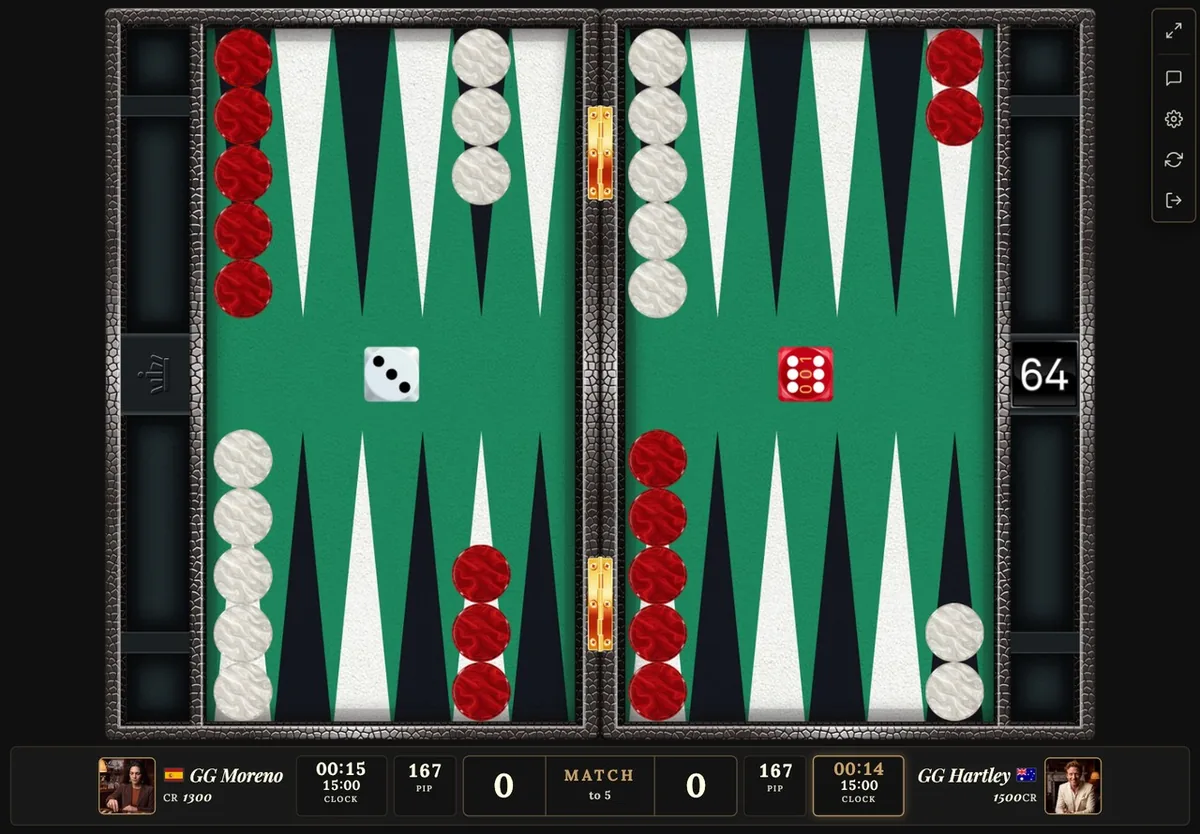
On a tablet the board gets more room and more stays visible.
The board becomes larger, more information can remain visible at the same time and there is more room around the playing area without sacrificing proportion.
For many players, a tablet will sit naturally between the convenience of a phone and the complete experience of playing on a desktop.
Put it on the table, turn it sideways and you have a large backgammon board in front of you without needing a computer.
Desktop is still the complete GamesGrid experience
GamesGrid works across devices, but we are not going to pretend that a phone and a large monitor offer exactly the same experience.
They do not.
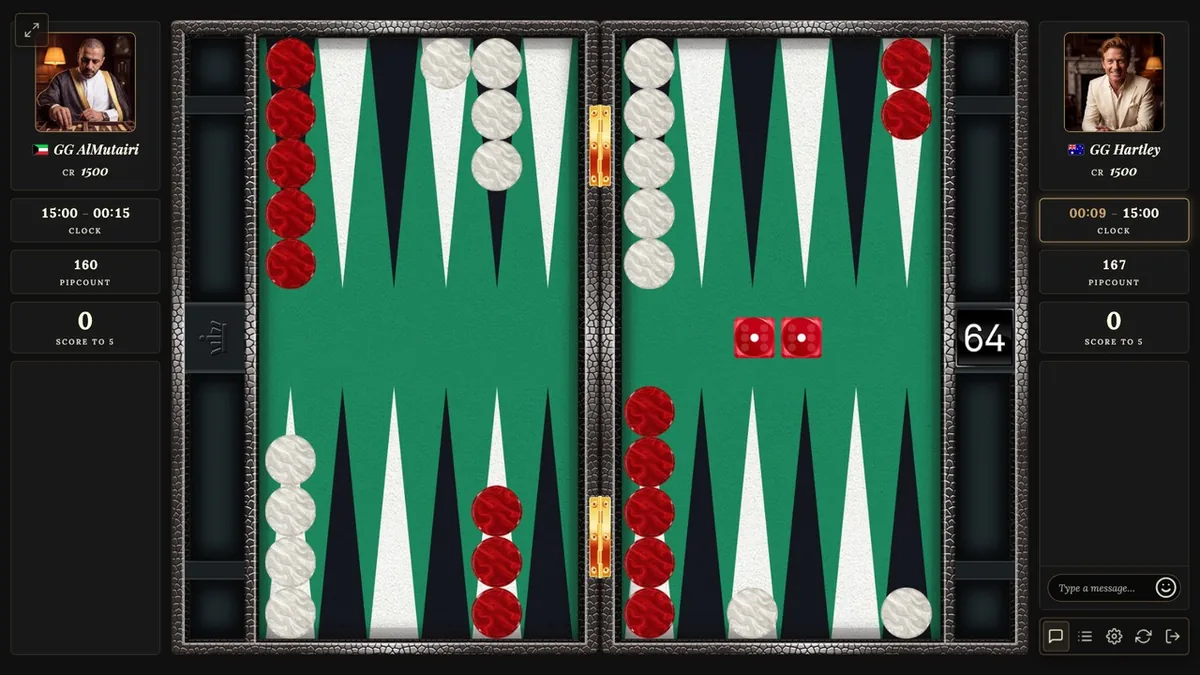
Desktop gives GamesGrid the room to show everything.
The board can be larger. More information can stay visible. Free chat, with a keyboard, is a desktop feature. Profiles, statistics and additional controls have space to live beside the game rather than compete with it.
On a desktop the board is largest and everything around it stays visible.
If you are settling in for a long tournament match, exploring Career Mode or spending an evening at the club, desktop will offer the richest GamesGrid experience.
Mobile is about making sure that when you are away from your computer, the game still feels like GamesGrid.
Even the analysis was redesigned for mobile
The match does not stop being interesting when the final checker comes off.
After every match, GamesGrid lets you review your decisions, revisit positions and see where mistakes were made. We considered this too important to make it a desktop-only feature.
So the analysis interface has its own mobile layout too.
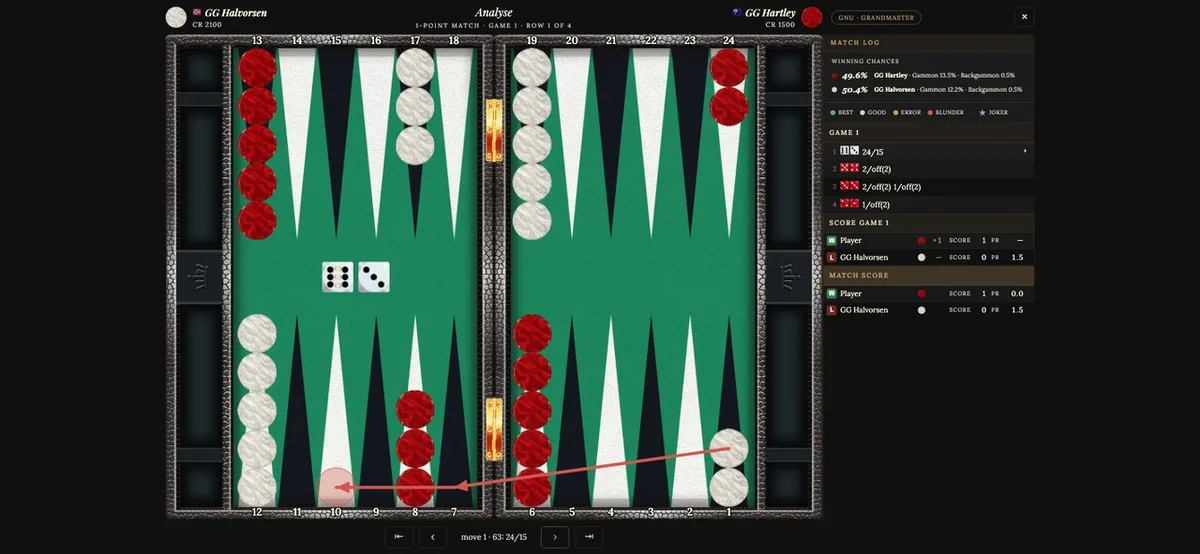
The match review on a phone: step through the decisions and bring the position back onto the board.
Turn your phone sideways and you can step through the match, select individual decisions and bring the position back onto the board.
The information is reorganised for the smaller display, but the purpose remains the same: let you understand what happened without having to wait until you are back at your computer.
A difficult cube decision on the train home can still be a position worth looking at again.
Add GamesGrid to your iPhone Home Screen
There is one limitation when you play any website directly through Safari on an iPhone: the browser interface takes up part of the screen.
For most websites that hardly matters. On a backgammon board, every millimetre helps.
The solution is to add GamesGrid to your iPhone Home Screen.
Once added, GamesGrid can open in its own app-style window without the normal Safari address bar, giving the game more of the available display.
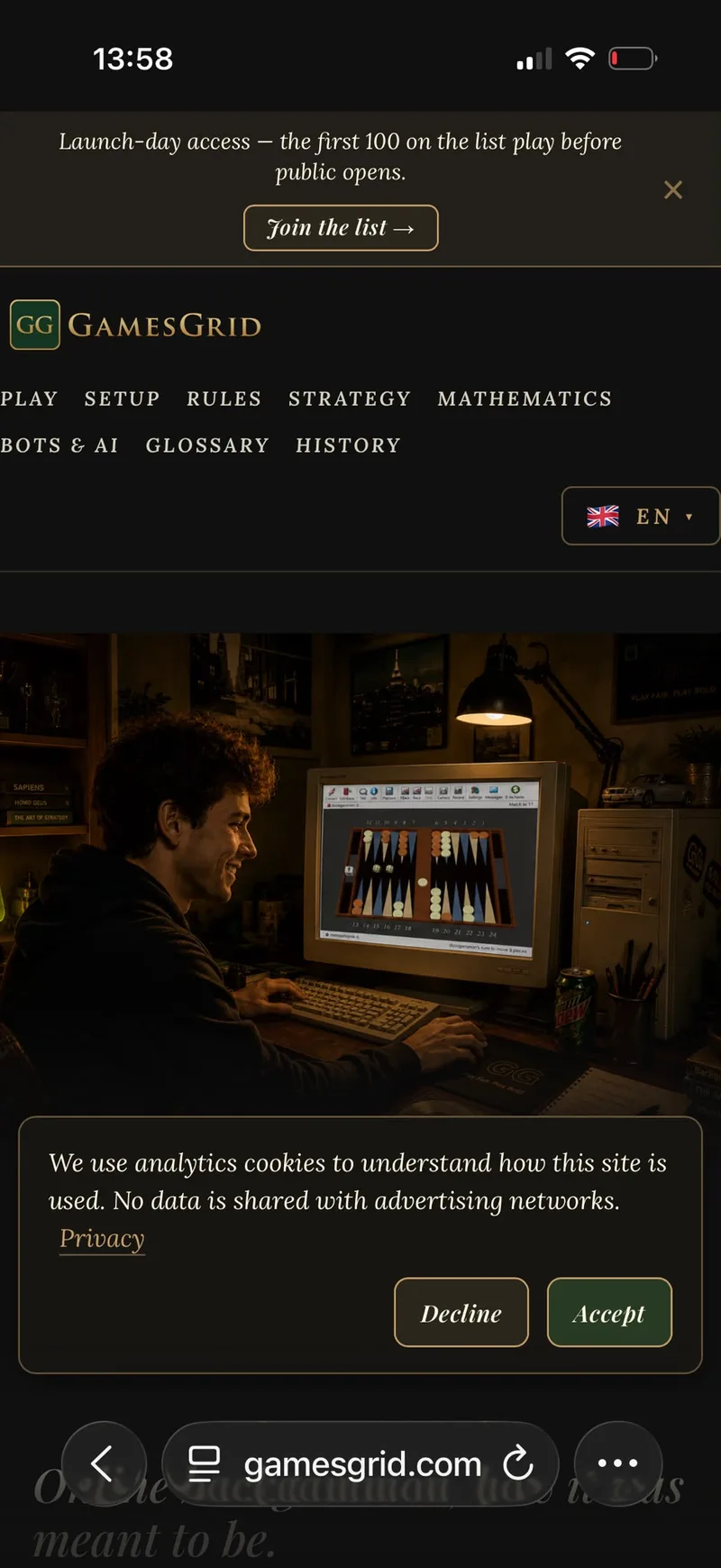
Open GamesGrid in Safari
Go to GamesGrid on your iPhone and tap the three dots in the right bottom corner next to the url gamesgrid.com.
Step 1: GamesGrid open, tap the three dots.
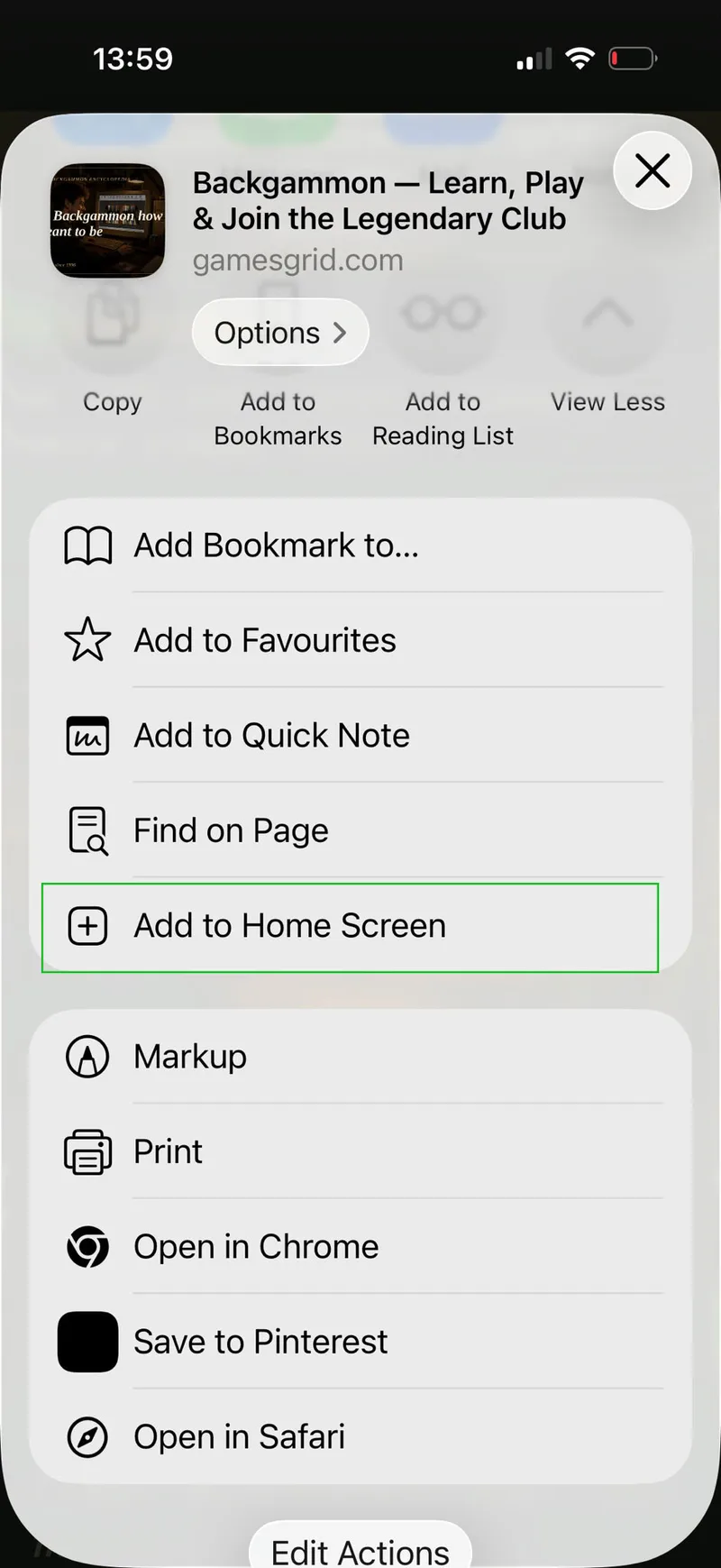
Tap Share and choose Add to Home Screen
After tapping the three dots you tap the first choice “Share” and then in the next menu scroll down and click “Add to Home Screen”.
Step 2: In the menu, after clicking “Share” you get the menu where you select “Add to Home Screen”.
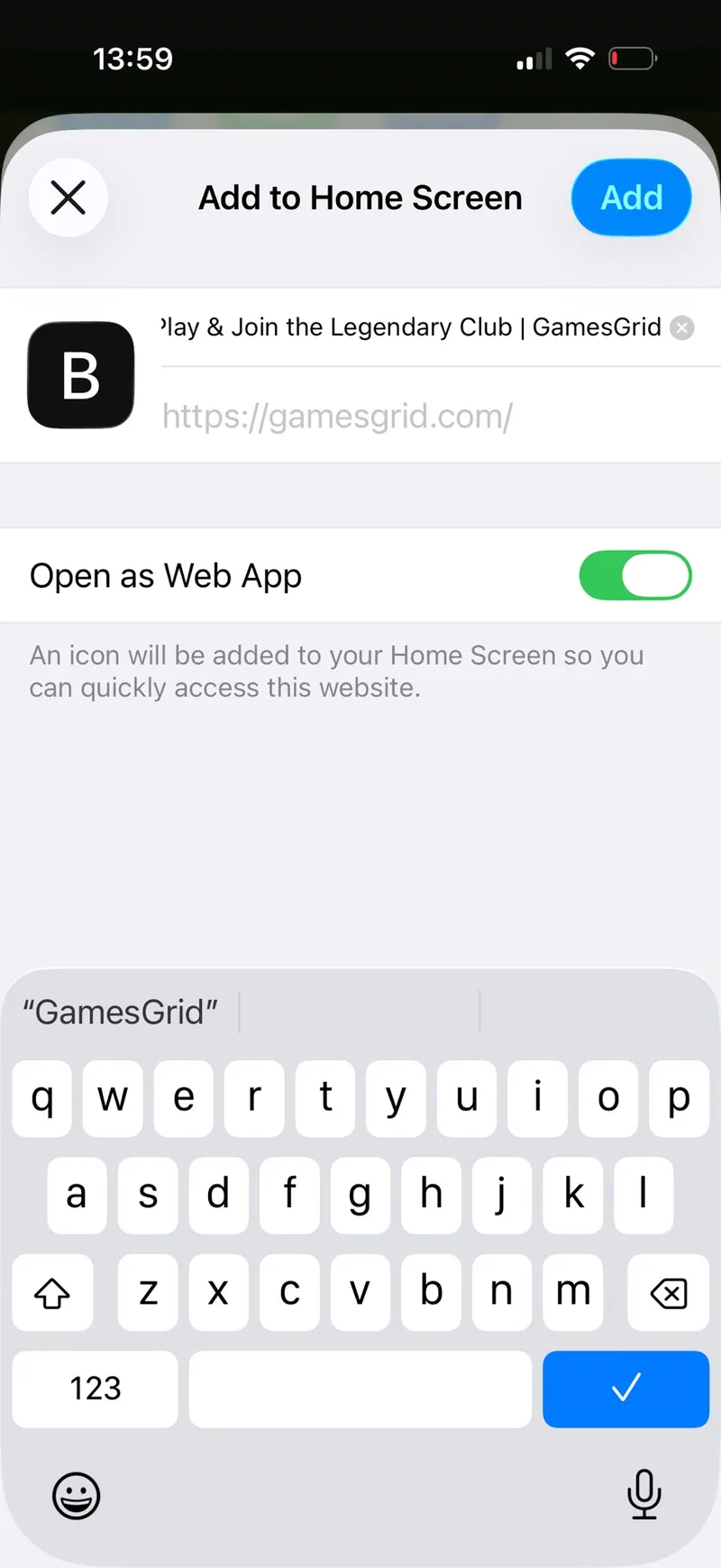
Add the icon to your Home Screen
Add the icon to your Home Screen, rename it if you want and make sure the toggle “Open as Web App” is on, as in the picture. Click the blue button “Add” to add the icon to your Home Screen.
Step 3: check the name and the toggle, then click “Add”.
Open GamesGrid from the new icon
A GamesGrid icon now appears alongside your other apps.
Tap it whenever you want to play and the page will load and play like a real App Store app.
GamesGrid opens in its app-style view, giving the board the maximum screen space available.
No App Store. No separate download. Just tap the icon and enter the club.
No update waiting between you and the board
Because GamesGrid runs through the web, you do not need to download a new version every time something changes.
New layouts, improvements and features can become part of GamesGrid without asking you to replace an old installation first.
Open GamesGrid and you are using the current version.
That also means the experience can continue to improve as we learn how people actually use it across different devices.
Your board, wherever you are
A desktop gives you the complete GamesGrid experience. A tablet gives the board plenty of room. A phone gives you a GamesGrid table you can carry in your pocket.
Different screens need different solutions, which is why we designed GamesGrid for each of them rather than simply shrinking one interface.
The device changes. The board remains the centre of the game.
Imagine online backgammon as a living world, where you compete against over 500 unique personalities from 120 countries. Every member has their own character, life story, voice, playing strength and style. They compete in the same leagues and tournaments as you, build careers alongside yours and remember the matches, conversations and history you create together.
Learn who they are. Adapt to how they play. Earn their respect, make friends, create rivalries and become part of their story—because they will become part of yours.